

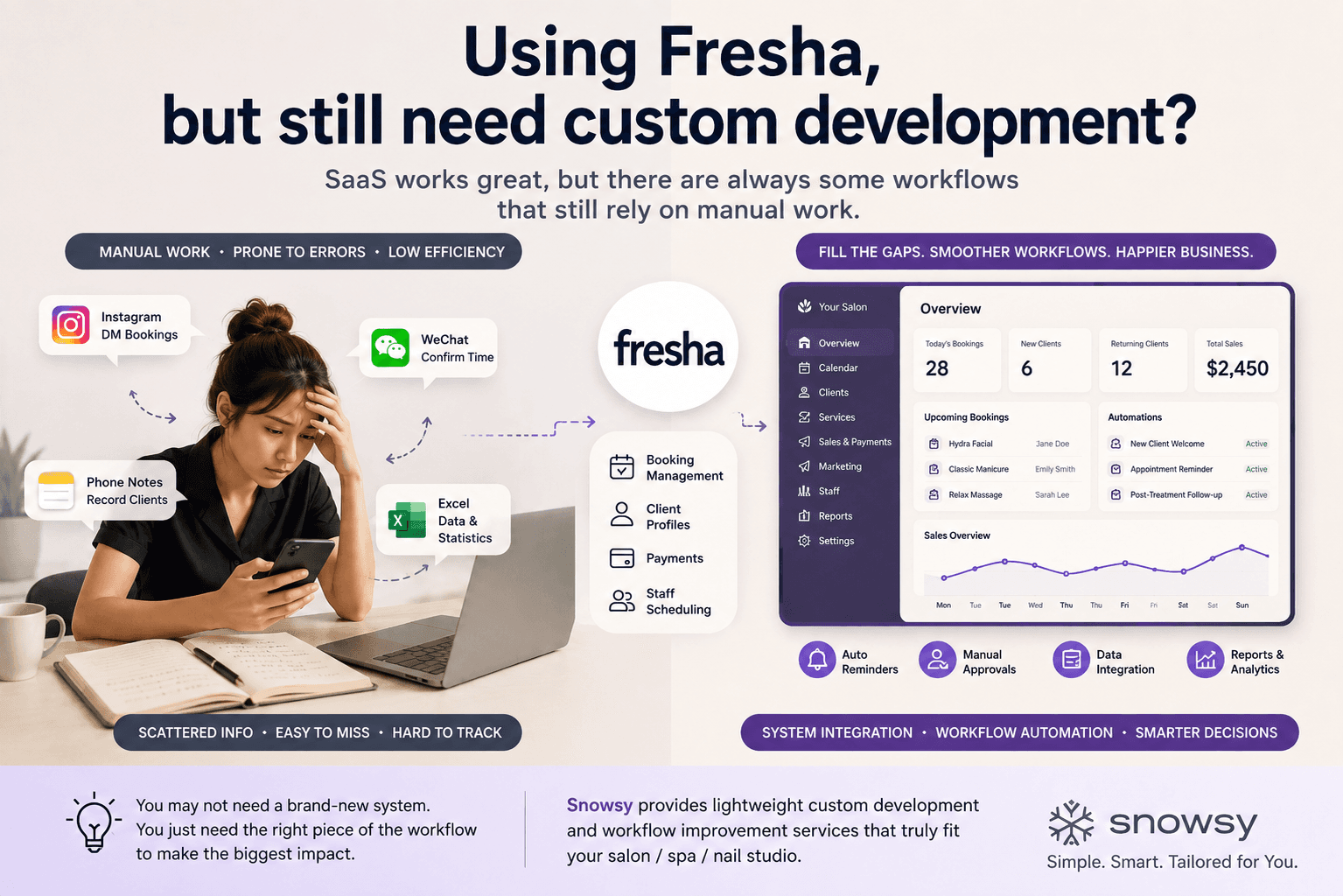
Many beauty salons, spas, and nail studios run into the same practical problem once they start digitising their operations: without software, management becomes increasingly messy; with SaaS, it still often feels like something is missing. There may be more tools available than ever, but when those tools are applied to real day-to-day operations, many tasks still end up being handled manually by the owner or staff.
Some businesses already use mature platforms such as Fresha, Timely, and Square to manage bookings, payments, staff scheduling, and customer information. Others, especially smaller salons and independent studios, still rely mainly on Instagram, Xiaohongshu, or WeChat messages to take bookings, combined with phone calendars, Excel spreadsheets, notes apps, or even paper records to manage daily operations.
These two approaches may look very different, but they often share the same underlying issue: the business workflow is not fully supported by software. In the first case, software is already in place, but certain business-specific processes are still unsupported. In the second case, many parts of the operation have not yet been brought into a unified system at all.
The problem is not necessarily that you “need another system.”
Very often, what is actually missing is a small connection in the middle of the workflow — something the existing SaaS cannot handle, but staff still have to manually complete every day.
Already Using Fresha? Why Can It Still Feel Inconvenient?
Platforms such as Fresha are already highly mature. For standard beauty-industry workflows such as bookings, staff scheduling, payments, and basic customer management, using an established SaaS platform is usually cheaper, more reliable, and easier than building an entire system from scratch.
The limitation is that SaaS products are designed to serve large numbers of businesses. They need to prioritise the most common and standardised needs across an industry, which means they cannot always match the exact operating rules, internal processes, and service requirements of one particular salon.
For example, some higher-value treatments may require a different deposit percentage from standard services. New customers may need to complete additional forms before their first appointment, while certain treatments may need manual approval from staff before they can be booked. Some salons may also have their own staff allocation rules, aftercare follow-up processes, membership upgrade workflows, or a need to connect data between their website, booking platform, and internal spreadsheets.
Individually, none of these requirements may seem like a “large feature”. But whenever the existing SaaS cannot support them, the work usually falls back onto staff. This creates a very common situation: the software has already been purchased, but Excel, chat messages, copy-and-paste work, and manual checks have not disappeared.
A Typical Situation Might Look Like This
| Business Process | Already Handled by SaaS | Still Requires Manual Work |
|---|---|---|
| Online booking | ✅ | Special services still require manual approval |
| Payments | ✅ | Different deposit rules need manual handling |
| Customer information | ✅ | Special forms are stored elsewhere |
| Staff scheduling | ✅ | Certain services require manual reassignment |
| Customer reminders | ✅ | Special pre- and post-treatment reminders are still sent manually |
| Reporting | Partially supported | Data from multiple systems still needs manual consolidation |
What makes a system feel inconvenient is often not that the SaaS is unusable. The real issue is that there are several small exceptions every day that still require manual intervention. One exception that takes two minutes may not seem significant, but if it happens dozens of times a day and repeats every week, it eventually becomes a long-term operating cost.
Salons That Haven’t Adopted SaaS Face a Different Problem
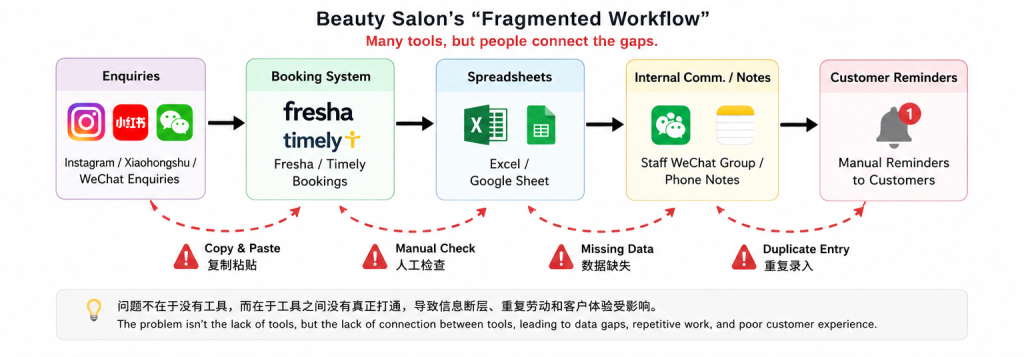
Some beauty salons, nail studios, and independent operators may not yet use a professional booking or customer management platform. Customers enquire through Instagram, Xiaohongshu, or WeChat, the owner manually confirms a time, and the appointment is then recorded in a phone calendar, notes app, or Excel spreadsheet.
When booking volume is still low, this approach can work perfectly well, and there is no reason every business must immediately buy a dedicated system. If one person only handles a small number of appointments each day, manually replying to messages and remembering customer requirements may even be simpler than learning a complicated platform.
Problems usually begin when the business starts growing. As customer volume increases, missed messages, unsynchronised booking changes, staff working from outdated schedules, lost customer information, and duplicate bookings become more common. The owner also gradually becomes the central point through which every part of the workflow must pass.
An even bigger issue appears when the owner wants to understand the business through data. For example:
- Which customers have not returned in the last three months?
- Which treatments have the highest repeat-booking rate?
- Which marketing channels bring in the most customers?
- Which staff member has the highest booking rate?
- Which customers frequently cancel appointments?
- Which service has grown the most over the last six months?
In theory, all of this data already exists. The problem is that it is scattered across Instagram messages, WeChat conversations, Excel spreadsheets, phone calendars, and different payment platforms. Without a consistent data structure, it is difficult to turn that information into something useful for business decisions.
At this point, what the business needs may not be a full-scale salon management platform. For many small operators, a more realistic first step is to identify the most chaotic or time-consuming part of the workflow, standardise that first, and then decide whether further digitisation is actually worthwhile.
Digitisation does not mean “put everything into one big system at once.”
For small businesses, it is often more practical to solve one recurring problem first, then expand gradually based on how the solution performs in real use.
Custom Development Does Not Mean Rebuilding Fresha
When small business owners hear the phrase “custom software”, they often imagine building their own app, CRM, booking platform, and management dashboard from scratch. Once they associate that idea with budgets of tens or even hundreds of thousands of dollars, custom development naturally feels unrealistic.
But this confuses “custom development” with “building an entire platform from the ground up”. For most small beauty businesses, there is little reason to rebuild functionality that Fresha, Timely, or Square already handles well, and doing so is rarely competitive from a cost perspective.
A more practical approach is often:
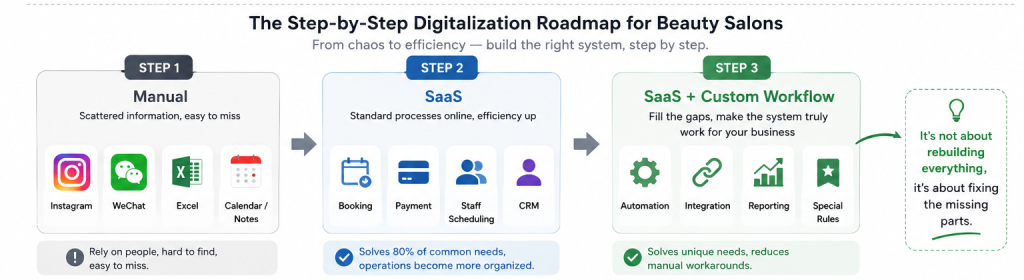
Keep using mature SaaS products, and only build the parts that existing software cannot handle well but that continue to affect operational efficiency.
For example, bookings can remain in Fresha, payments can continue through the existing payment provider, and the website can remain on WordPress, Shopify, or another established platform. Custom development can then focus only on a specific part of the workflow, such as special booking approvals, customer data organisation, pre- and post-treatment reminders, internal reporting, or data synchronisation between different systems.
In this model, custom software is no longer a large standalone “new system”. Instead, it becomes a lightweight business layer that connects existing tools. Its purpose is not to replace everything, but to make the current combination of tools work in a way that better matches the business itself.
Comparing the Different Approaches
| Approach | Best Suited For | Advantages | Limitations |
|---|---|---|---|
| Fully manual | New businesses with very few bookings | Lowest cost and very flexible | Difficult to scale and heavily dependent on the owner |
| Mature SaaS | Businesses with standard workflows | Quick to launch, stable, cost-effective | Limited support for special workflows |
| SaaS + lightweight customisation | Businesses already using established tools but with unique processes | Controlled cost and highly targeted | Requires some workflow analysis first |
| Fully custom system | Larger businesses with highly unique processes | Maximum flexibility | Higher development and maintenance cost |
For many small beauty businesses, the third option is easy to overlook. It allows them to reduce manual work without committing to the cost and complexity of replacing everything with a fully custom-built platform.
If You Still Rely on Messages and Excel, You Don’t Need to Do Everything at Once
For businesses that do not yet have a formal system, it is equally important not to build a complex platform simply for the sake of “digitisation”. When the underlying business processes are still changing, developing too many features too early can easily result in money being spent on functions that nobody actually uses six months later.
A better approach is usually to start with one very specific problem. That might mean centralising all bookings, organising customer information, automating reminders, or building a simple internal management page for staff.
Suppose a small studio currently receives all of its bookings through Instagram and WeChat. The first stage might only require a simple internal page where staff can record the customer, service, appointment time, and status in one place. Once the team has used it for a while, features such as reminders, reporting, customer tags, or online booking can be added based on actual demand rather than trying to design a complete ERP system from day one.
This approach has one major advantage: every stage of the software can be validated through real business use. If staff genuinely use a feature, it can be expanded. If they do not, it can be adjusted early instead of discovering six months after launch that the entire direction was wrong.
How Do You Know Whether a Process Is Worth Developing?
A simple way to judge is to look for tasks that you or your staff repeat every week. For example, spending 20 minutes a day copying customer details, organising bookings, sending the same messages, or updating Excel may not seem like much in isolation, but over time it can add up to dozens or even hundreds of hours.
Suppose two employees each spend 15 minutes per day organising booking and customer data, five days a week. Over the course of a year, that adds up to more than 120 hours. If a lightweight automation can eliminate most of that manual work, the commercial value of the feature becomes much easier to calculate.
On the other hand, if a special case only happens once or twice a year, paying to automate it may not make sense. Continuing to handle it manually may actually be the more sensible business decision, even if the process feels less sophisticated.
So before deciding whether a feature is worth developing, ask four questions:
| Question | If the Answer Is “Yes” |
|---|---|
| Does this task happen every week? | Worth evaluating further |
| Does it consume a noticeable amount of staff time? | Automation may have higher value |
| Is it prone to human error? | Systemisation may have higher value |
| Does the workload increase as customer volume grows? | Solving it earlier may be more valuable |
The real value of custom development is not the number of features or how sophisticated the system looks. The most worthwhile features are usually those that address problems that are recurring, measurable, and genuinely wasting time or creating errors.
Is It Really Worth Building Something That Saves 20 Minutes a Day?
When small businesses evaluate software, they often focus only on development cost and overlook the cost of the existing manual process. Twenty minutes per day may sound insignificant, but if two or three employees repeat the same task for months or years, the accumulated cost can become substantial.
There are also costs that are harder to see directly in the accounts. Forgotten customer replies, duplicate data entry, booking changes that fail to synchronise, or situations where nobody knows how a process works because the owner is away are all examples of hidden costs created by weak software and workflow design.
So when evaluating a software investment, it is better not to ask only:
“How much will this feature cost to build?”
You should also ask:
“If we change nothing, how much time will we continue spending on this over the next year?”
Once the second figure begins to clearly exceed the first, automation or lightweight custom development starts to make much more commercial sense.
SaaS and Custom Development Are Not Either-Or Choices
For small beauty businesses, the right software strategy is usually neither “use SaaS for everything” nor “build everything ourselves”. A more common and economical approach is to leave standard industry requirements to mature software and only customise the business-specific workflows that existing platforms do not handle well.
If Fresha already solves 80% of your requirements effectively, there is little reason to replace the entire platform because of the remaining 20%. The more useful question is whether that remaining 20% includes a few processes that consume staff time every day and are already affecting customer experience or operational efficiency.
Likewise, if the business still relies mainly on messages, Excel, and phone records, there is no need to jump directly into a large platform. Bringing the most important part of the workflow into software first, then expanding gradually based on actual usage, is usually safer than buying or developing a large amount of functionality all at once.
The best software for a small business is not necessarily the software with the most features.
It should reduce manual work in the right places while preserving the flexibility the business actually needs.
Maybe You Don’t Need a Bigger System
The value of software is not determined by how large the system is or how many pages exist in the admin dashboard. For beauty salons, spas, nail studios, and independent operators, what matters is whether the software reduces repetitive work, removes unnecessary manual tasks, makes booking and communication easier for customers, and helps the owner understand what is happening across the business.
For businesses already using SaaS but still relying heavily on manual workarounds, the answer may not be replacing the existing platform. It may simply be filling in the missing parts of the workflow. For smaller businesses that are only beginning to digitise, there is also no need to start with a complex platform.
Between SaaS and a fully custom-built system, there is a third option: lightweight custom development, workflow automation, and integration with the tools you already use. Solving one specific problem can still be a complete and worthwhile software project.
Snowsy provides lightweight custom software development, workflow automation, and existing-system integration for small businesses. Rather than rebuilding a large platform from scratch, we prefer to first identify the most valuable problem in the business, determine whether it is worth solving with software, and then decide whether further development makes sense.
You may not need a bigger system.
Often, what really needs to be fixed is simply the small missing piece in your workflow.