

As businesses become more digital, many eventually face a question that sounds simple but is actually difficult to answer: should we keep buying SaaS tools, or should we build our own system?
Recruitment agencies are a good example. There are already plenty of mature ATS, CRM, job board and candidate management platforms on the market, and common needs such as job posting, candidate records and interview tracking can usually be handled by existing software.
But once these systems become part of daily operations, another problem often appears. Even though the software is already in place, staff may still spend significant time copying information between Excel, email, LinkedIn, PDFs and different SaaS platforms.
This can push businesses towards the opposite extreme: if SaaS is not enough, should we simply rebuild everything ourselves?
In reality, there is a third option between these two approaches.
Your software choices are not limited to “buy an off-the-shelf SaaS product” or “spend five figures building a complete custom system”.
In many cases, a better approach is to keep the software that already works and customise only the parts of the workflow that are still missing.
This is where lightweight system and feature customisation comes in.
Why SaaS Should Usually Be the First Choice for Small Businesses
For most small businesses, SaaS should usually be the starting point. A mature SaaS product already takes care of many underlying technical responsibilities, including authentication, security, databases, permissions, backups, email, hosting and ongoing updates.
Recruitment is a good example. A small recruitment agency can use platforms such as JobAdder, Bullhorn, Workable, LinkedIn Recruiter or another ATS to manage jobs and candidates without having to build its own recruitment platform from day one.
If an existing product already covers 80% to 90% of the business requirement, rebuilding the same functionality is often expensive without creating much additional business value. Development investment is usually better spent on processes that are specific to the business rather than features that have already become industry standards.
Do not spend money rebuilding something that the market has already solved well.
Custom software should solve problems that existing tools cannot reasonably handle.
When Is SaaS Usually a Good Fit?
| Situation | Is SaaS Suitable? |
|---|---|
| The requirement is common across the industry | ✅ Very suitable |
| The business wants to get started quickly | ✅ Very suitable |
| The team is relatively small | ✅ Usually suitable |
| There is no internal development team | ✅ Usually suitable |
| The workflow is highly specialised | ⚠️ May be limiting |
| Staff frequently move data between multiple systems | ⚠️ Worth reviewing |
| Software is part of the company’s core competitive advantage | ❌ May not be enough |
The biggest advantage of SaaS is that it solves common business problems in advance. In recruitment, functions such as job management, candidate records, interview stages, client contacts, email notifications and basic reporting are highly standardised.
That is why a mature ATS can support thousands of recruitment agencies at the same time. For a small business, this is often far more economical than taking on the cost of developing and maintaining the same functionality internally.
The Real Problem Often Appears in the Last 10% to 20% That SaaS Does Not Cover
The problem is usually not that SaaS is completely unusable. Instead, as a business develops, its actual way of working begins to differ from the default workflow provided by the software.
Imagine a recruitment agency that already uses an ATS. Candidates can be stored in the system, jobs can be created and recruiters can update each candidate’s progress through the interview process, so at first glance the recruitment workflow appears fully digital.
In practice, recruiters may still need to collect candidate information from LinkedIn and email, review CVs against different job requirements and manually prepare lists of suitable candidates. They may then need to write candidate summaries, update spreadsheets, synchronise information with a client’s system and finally update the ATS again.
None of these tasks looks particularly significant in isolation. But when the same small tasks are repeated dozens of times every day, they can gradually consume a substantial amount of staff time.
The most common problem with SaaS is not that it “doesn’t work”. It is that 90% works well, while the remaining 10% still has to be handled manually.
That remaining 10% is often where lightweight customisation provides the most value.
Lightweight Customisation: Fill the Missing Workflow Instead of Rebuilding the Entire System
If the recruitment agency’s ATS already works well, a sensible software project should not begin with the question, “How do we rebuild our ATS?” A much better question is: where are recruiters spending the most unnecessary time every day?
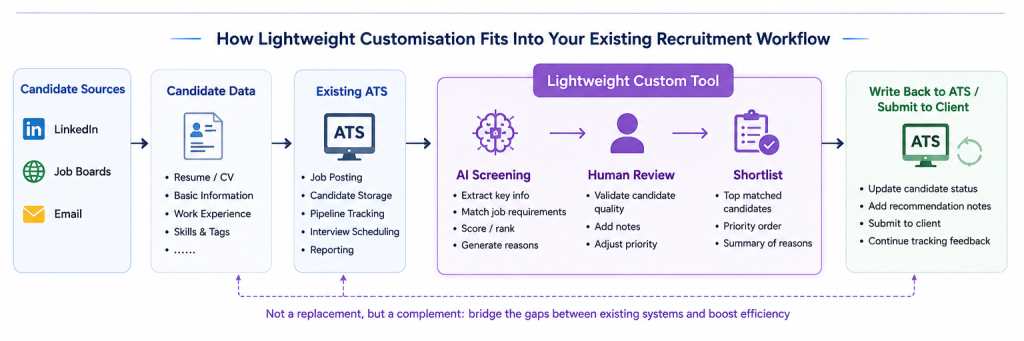
For example, the team may discover that recruiters spend a large amount of time reviewing new CVs and performing the first round of sorting against job requirements. Suitable candidates then need to be reformatted into a consistent structure before being reviewed by a senior recruiter.
The first phase of development could therefore be limited to a lightweight workflow:
Job Requirements → Candidate CV → AI-Assisted Initial Analysis → Human Review → Candidate Shortlist
The existing ATS does not need to be replaced. LinkedIn does not need to be replaced, and the recruitment website does not need to be rebuilt either.
Instead, the business simply adds a targeted tool to improve one of the most time-consuming parts of the workflow. This is the main difference between lightweight customisation and a fully custom system: the starting point is not “how much can we build?”, but “what is the smallest thing we can build that solves the most valuable problem?”
What Is the Difference Between SaaS, Lightweight Customisation and a Full Custom System?
Once the three approaches are placed side by side, the difference becomes much clearer. SaaS is designed to solve standardised problems, lightweight customisation targets specific workflow gaps, while a full custom system is better suited to highly specialised processes or software that has become part of the company’s core competitive advantage.
| SaaS | Lightweight Customisation | Full Custom System | |
| Initial cost | Low | Low to medium | High |
| Time to launch | Fastest | Relatively fast | Slowest |
| Customisation | Limited | Medium to high | Highest |
| Keep existing systems? | Yes | Usually | Not necessarily |
| Maintenance complexity | Low | Medium | High |
| Best for | Common business requirements | Specific workflow problems | Complex core business processes |
| Suitable for small businesses | Very suitable | Very suitable | Depends on the situation |
| Project risk | Lower | More controllable | Higher |
Lightweight customisation is not simply a “smaller version” of a full custom system. It represents a different way of investing in software: keep what already works, and spend development resources only where there is a genuine gap.
This is especially important for small businesses. Many companies do not actually suffer from a lack of software; they already have several systems in place, but employees still need to manually bridge the gaps between them.
In these cases, the answer is not necessarily another SaaS subscription, nor is it necessarily a complete rebuild. A small internal tool, a data synchronisation process or one targeted custom feature may be enough.
When Does a Full Custom System Actually Make Sense?
Full custom software absolutely has its place, but it solves a different kind of problem. It becomes more valuable when existing SaaS products can no longer support the company’s core business model, or when the software itself has become part of the product the company sells.
Consider the recruitment agency again. If the company simply needs to manage jobs and candidates, a mature ATS will usually be sufficient.
But imagine the company evolves into a platform with its own candidate marketplace, client self-service portal, automated matching, subscription billing and complete transaction workflows. At that point, the ATS may no longer be suitable as the company’s core system.
A full custom system is also expensive for reasons that go far beyond the number of pages on the screen. A production system may need to handle user permissions, file storage, search, email, backups, audit logs, security, deployment and failure recovery.
What happens if a candidate’s CV fails to upload? What happens if an employee accidentally deletes important information? Should a client be able to see recruiters’ internal notes?
What happens when an employee leaves the company? What happens to the workflow if a third-party service becomes unavailable?
The expensive part of a full custom system is often not drawing the screens.
The real cost comes from making the business behind those screens reliable, secure and maintainable over the long term.
If a company only has one local workflow problem, using a full custom system to solve it can easily become an overinvestment.
Do Not Only Look at Development Cost — Consider the Cost of Doing Nothing
When businesses evaluate custom software, they often focus on one question: how much will development cost? That question matters, but looking only at the quoted price can hide the operating costs that continue to accumulate on the other side.
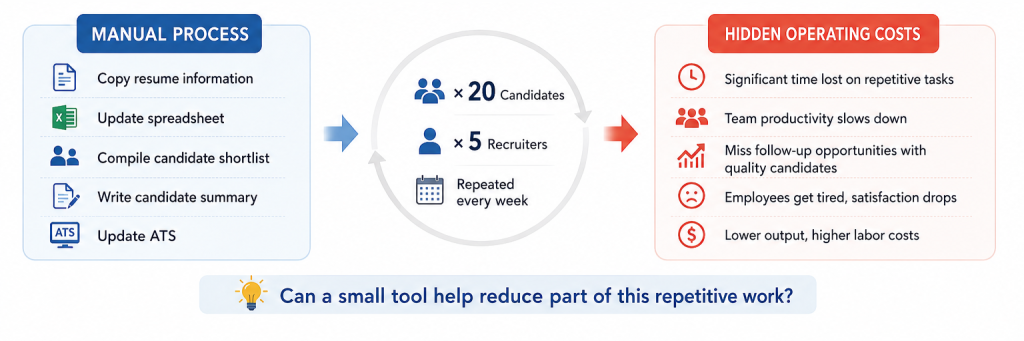
A recruiter may need to copy CV information, update spreadsheets, prepare candidate lists, write candidate summaries and then update the ATS. Each individual action may only take a few minutes, so it is easy to ignore.
But if one recruiter repeats these tasks for 20 candidates, and five employees do the same thing every week, those “few minutes” can quickly turn into a substantial amount of manual work. Repetitive administration can also create data errors, missed follow-ups, inconsistent processes and staff fatigue.
So when evaluating whether a custom tool is worth building, the question should not only be:
“How much will this tool cost to build?”
It should also be:
“If we do nothing, how much time and labour will this process continue to consume over the next year?”
How Should a Small Business Decide Which Option It Needs?
In practice, it is usually better to start with the business problem rather than the technology. Identify what is going wrong first, and then decide whether the right solution is SaaS, lightweight customisation or a full custom system.
The first question is: can an existing SaaS product already solve this problem? If the answer is yes and the price is reasonable, an off-the-shelf product should normally come first.
There is little reason to rebuild mature industry functionality simply for the sake of having complete control.
The second question is: does the SaaS already handle the main workflow, while employees still spend significant time completing the remaining steps manually? If staff constantly move data between systems, regenerate the same content or carry out repetitive rule-based administrative work, lightweight customisation may be worth evaluating.
The third question is: has the existing software started to restrict the company’s core business? If the business model itself has become highly specialised, or if software has become part of the product being sold, then a full custom system may provide genuine long-term value.
Most businesses do not build their software environment in one step. It usually develops gradually as the business itself becomes more complex.
A company may begin with Excel, spreadsheets and manual processes. Once the workflow becomes more stable, it may introduce SaaS to handle standardised requirements; if repetitive work remains, the next step may be automation or lightweight customisation.
Only when the business becomes more specialised and existing SaaS begins to restrict core operations does it usually make sense to consider building a complete proprietary system. In other words, software investment should grow with the business rather than forcing the company to build a large platform before the need has been properly validated.
This gradual approach has another practical advantage: the company can begin with one small problem and test whether solving it actually creates value. If a lightweight tool already removes most of the pain, there is no reason to immediately expand the project.
Additional functionality can be added later, when new problems appear and the business value is clear.
Conclusion: The Best System Is Not Necessarily the One With the Most Features
SaaS, lightweight customisation and full custom systems are not mutually exclusive. A recruitment agency can use a mature ATS, CRM and accounting SaaS while still operating several small custom tools of its own.
What matters is not whether every system was built internally. What matters is whether the overall workflow is clear, efficient and reliable.
For many small businesses, a perfectly reasonable software setup might be 80% SaaS + 15% automation + 5% custom functionality.
The real mistake is treating digital transformation as a process of continuously adding more software. A company buys a CRM, then another automation platform, then another AI tool, until employees are opening ten different systems every day and still do not know which one contains the authoritative version of the data.
Good software investment is not about giving a business more systems.
It is about reducing the number of meaningless steps employees need to perform to complete the same work.
Before considering custom development, one of the most useful questions a business can ask is therefore very simple:
What is the most repetitive, time-consuming and standardisable task our team performs every day?
If a mature SaaS product already solves it, use the SaaS.
If only one small part of the workflow is missing, lightweight customisation may be enough.
Only when the company’s core business can no longer be supported by existing software does it make sense to seriously consider building a complete custom system.