


For many small business owners, “system operations” immediately conjures images of large internet companies: server clusters, 24/7 on-call shifts, walls of monitoring screens, and dedicated SRE teams. When your own system might only serve a few dozen or a few hundred users a day, a natural question arises: Do we really need all that?
Even when a real outage occurs, the first reaction is often: “It was only down for a few minutes. We’re not a bank—how much money could we have lost?”
That question is completely reasonable.
Small businesses have no need to copy the full operational systems of big tech companies. But the opposite extreme—launching a system and then completely ignoring it until customers report that something is broken—creates unnecessary risk of its own. A recent real production incident we handled illustrates this point clearly.
This article is based on an anonymised real project. Client name, specific business details, and certain technical specifics have been removed to protect privacy.
TL;DR: Why small businesses still need basic operations
- Small businesses do not need “big-tech SRE,” but they should at least know when the system starts going wrong.
- In this incident, the system had already been abnormal for some time before the client noticed.
- “It recovered after a restart” only proves the service is temporarily usable again—it does not prove the problem is fixed.
- A localised database issue can be amplified by retries, background jobs, and request pile-ups until the whole system degrades.
- For customers, ten minutes of downtime is rarely just “ten minutes of lost revenue.”
- During a failure, users should see a friendly degradation page, not a cryptic Internal Server Error.
- Monitoring, alerting, backup checks, and post-incident reviews do not require hiring a full-time DevOps engineer.
- What most small businesses really need is simply this: when something goes wrong, someone knows; when something goes seriously wrong, someone is responsible.
“The system was only down for a few minutes” may not be the full story
In this incident the client discovered the system was unusable in the evening. From a pure user perspective it is easy to conclude: “The website suddenly went down at night.”
After checking the logs, however, we found that anomalies had already started appearing earlier. Because there was no proper monitoring or alerting, no one received a notification when the first signs of trouble appeared.
In other words: the moment the system begins to fail and the moment the business owner notices the failure can be two completely different times.
This is one of the most important differences between “no operations at all” and “at least basic monitoring.” A system does not have to be failure-proof. It should, at minimum, be able to tell you when it starts behaving abnormally.
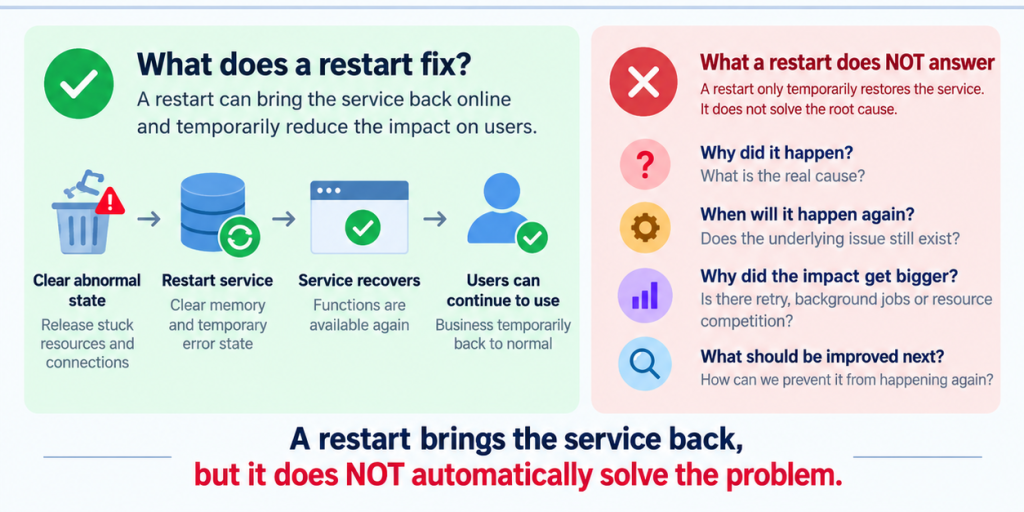
It recovered after a restart—why keep investigating?
The incident was temporarily resolved by restarting the backend application. If this were a home router, the story might end there: not working → restart → working again. Production systems cannot stop at that step.
A restart only answers the question: “How do we restore service for now?”
It does not answer: “Why did this happen?”
Nor does it answer: “When will it happen again?”
If the root cause is resource exhaustion, unbounded retries, database connection contention, or interference between background jobs, a restart merely clears the accumulated bad state. The underlying problem remains.
Restoring service and resolving an incident are two different things. A more mature operations process restores business first, then continues investigating the cause, and finally decides what needs to be improved.
Small businesses are not banks—but they still have their own “critical ten minutes”
Many owners continue: “Even if it is down for ten minutes, we won’t lose millions. Is it really worth the effort?”
If you only count direct revenue, that judgement may be correct. But the real risk for small-business systems is rarely measured in “revenue lost per minute.”
Consider a few realistic scenarios:
| When the system fails | What the user actually experiences |
|---|---|
| A new customer tries to register for the first time | “Is this platform even reliable?” |
| Sales is demoing the product to a prospect | “Why can’t you open your own system?” |
| Ads have just started running | Potential customers who click through cannot register |
| Staff are processing the day’s work | Backend is inaccessible; work has to stop |
| An existing customer is about to pay or submit documents | Operation fails; they have no idea whether data was saved |
These events may last only ten minutes. The customer, however, does not know: “Oh, this was just a ten-minute technical glitch.” What they see is a very simple outcome: when I needed to use your system, it did not work.
For a small business still building reputation, that experience can sometimes cost more than the ten minutes of revenue itself.
The real problem is not the failure—it is the system making the failure worse
This incident also had a very typical characteristic. The initial problem was not “everything on the website broke at once.” It began as a database connection anomaly.
In theory, a reasonably resilient system should be able to: fail some requests, pause non-critical background jobs, reduce retries, wait for the database to recover, and then gradually return to normal.
In the actual system, new requests kept arriving, failed operations continued retrying, and background tasks kept competing with user traffic for limited resources. A localised failure gradually expanded to login, queries, file access, and background jobs.
This is what the industry calls a cascading failure. The logic is not complicated: if one road is already blocked and every vehicle keeps driving into it, the jam only gets worse.
That is why modern software uses rate limiting, circuit breakers, and graceful degradation. At their core they all do the same thing: when the system is already in trouble, stop actively making the trouble bigger.
“Internal Server Error” is not an acceptable failure experience
The incident also exposed another issue. Even after the backend had become severely unhealthy, users could still open pages, click login, or submit forms—and then receive an Internal Server Error.
A developer sees that message and understands: “Backend returned 500.” An ordinary user usually asks a series of other questions: Did I type the wrong password? Is my account broken? Did my data get saved? Is it my computer? Or is the whole website down?
We therefore planned to add a degradation layer. When health checks confirm the backend is unavailable, or critical requests repeatedly time out or return 5xx, the frontend stops submitting useless requests and instead tells the user clearly: “The system is temporarily unavailable. We are working on it. Please try again later.”
This will not make the servers recover instantly. But it turns a chaotic technical failure into a controlled user experience—already a very practical improvement for a small business.
Monitoring is not about building a beautiful wall of screens
Another common misconception is that “monitoring” automatically means deploying a large, complex stack of tools. That is not necessarily true.
For a small business system, the first-stage metrics that actually matter are often few:
| What you need to know | Why it matters |
|---|---|
| Is the website still reachable | Most basic availability |
| Is the backend continuously erroring | Detect problems before customers report them |
| Are database connections approaching exhaustion | Spot resource pressure early |
| Did backups succeed | Avoid discovering there is no backup only when you need it |
| Has the login failure rate spiked suddenly | Catch authentication or attack anomalies |
| Did critical background jobs succeed | Prevent “silent failure” of background tasks |
These metrics do not require building a monitoring platform from scratch. Plenty of mature tools already handle basic log collection, health checks, and alerting. The brand of tool is secondary. What matters is: when an alert fires, does someone actually look at it?
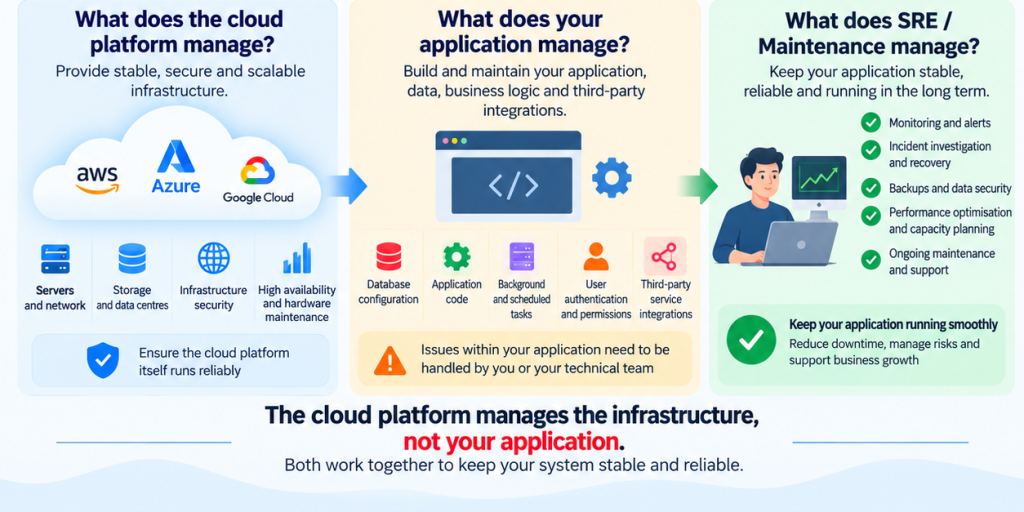
Having a cloud provider does not mean your application is being looked after
Many companies now host their servers on AWS, Azure, Supabase, Vercel or other cloud platforms. This easily creates an illusion: “Our system is hosted by a big company, so it should be safe.”
Cloud providers are responsible for the infrastructure they sell. They will not decide for you whether your background jobs have too much concurrency, whether your application keeps retrying forever after a database failure, whether your backup job is competing with live traffic for resources, whether your login endpoint is seeing abnormal traffic, or whether a recent release broke business logic. Those still belong to your application.
Think of it as renting an office. The building management looks after the elevators, power, water and common areas. They do not manage your customer records, staff workflows or business systems. The cloud provider runs the platform. Your technical team (or your operations partner) is still responsible for the application.
What small businesses need is right-sized operations
None of this means every small business should hire three DevOps engineers, run Kubernetes, maintain a dozen environments, and staff 24×7 shifts. That would be the other extreme.
A newly launched MVP may only need: health checks, basic logging, database monitoring, daily backups, and failure alerts. As the business grows, you can add rate limiting, graceful degradation, automated recovery, capacity planning, and more complete tracing. Only when the system truly requires a dedicated team do you build an internal SRE or Platform team.
Proper operations is not an all-or-nothing decision. It should grow with the business risk. This is the same principle as software architecture itself: do not solve problems that do not yet exist—but also do not keep pretending real problems are invisible.
No operations vs outsourced operations vs full-time engineer
For most small businesses the real comparison is not “Do we need operations?” but “How much operations do we need?”
| Approach | Advantages | Main drawbacks | Best suited for |
|---|---|---|---|
| No operations at all | Almost zero direct cost | Problems are discovered by customers; risk is uncontrolled | Prototypes, internal demos |
| Snowsy SRE operations service | Investment scales with actual business needs; continuous technical attention | Not suitable for large systems that need a full-time internal team | Small businesses, MVPs, early-stage SaaS |
| Full-time DevOps / SRE | Deep involvement in the business; strong response capability | High salary, Super, recruiting and management costs | Teams that already have stable scale |
What many small companies actually need is the middle option. The system has become important enough that “we’ll deal with it when it breaks” is no longer acceptable, yet it is not yet important enough to justify a full-time hire.
Snowsy SRE operations: systems do not need to be perfect—they just cannot stay naked
Snowsy provides SRE / system operations services aimed at small businesses and early-stage projects. Even if you do not currently need new feature development, we can help with application and database monitoring, logging and alerting, backup verification, incident investigation, deployment processes, staging environments, capacity planning, rate limiting and degradation, and technical post-mortems after incidents.
Our goal is not to turn a system that serves a few dozen users a day into Google. It is, within a reasonable budget, to ensure at least this: when something goes wrong, someone knows; when a real incident occurs, someone handles it; and after it is handled, the response is more than a restart—you know what should be improved next.
If your current situation is still “as long as the server responds, everything is fine; if it goes down we wait for customers to tell us,” you may not need to hire a full-time technical team tomorrow. But it is worth starting to ask: shouldn’t someone be watching it for you?