

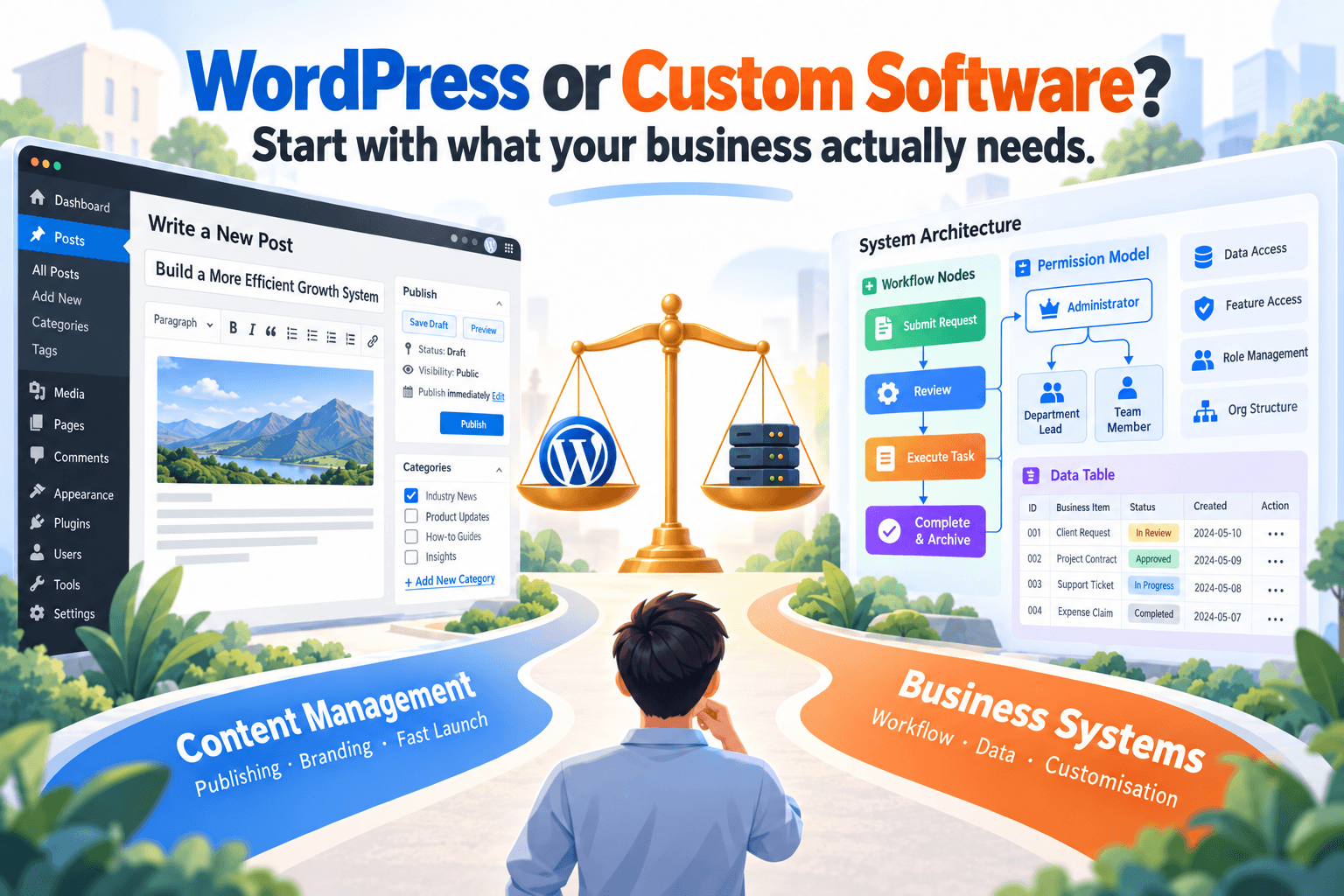
When businesses plan a new website or online system, most of them run into the same question: should we use WordPress, or build our own system from scratch? The answers online tend to be extreme. One camp says WordPress is mature, affordable and has a plugin for everything; the other says that the moment a project gets slightly complex, you should abandon WordPress and rebuild it all.
Real projects are rarely that black and white. WordPress has clear strengths and scenarios it handles well, and a custom system isn’t a “premium upgrade” from WordPress. It’s simply a different tool that becomes a better fit once a business reaches a certain level of complexity. In fact, Snowsy’s own website uses WordPress for content management.
So this article isn’t about whether WordPress is “good”. It’s about a more practical question: what stage is your project at, and what problem are you actually trying to solve?
TL;DR
- WordPress is an excellent fit for business websites, blogs, content marketing, SEO pages and a wide range of standard website needs.
- Its biggest value isn’t just “fast setup”. It’s the mature admin, content management and plugin ecosystem.
- Rebuilding a feature that already has a stable, well-maintained plugin doesn’t make it more professional.
- Once you need complex permissions, internal approvals, business states, automation and heavy system integration, it’s time to reassess whether WordPress is still the right tool.
- The value of a custom system isn’t “more code”. It’s software designed around your own business processes.
- Custom systems aren’t inherently more secure, stable or advanced. They come with higher development and long-term maintenance costs.
- WordPress and custom systems aren’t necessarily either/or. For many projects, the best answer is to use both.
- A WordPress site that’s been running for years (including unmaintained in-house plugins) doesn’t have to be torn down. It can be assessed, taken over and improved step by step.
Why Is WordPress Still Worth Using Today?
WordPress has been around for a long time. Partly because of that, some people assume that with modern front-end frameworks, cloud platforms and AI tools available, sticking with WordPress must be “behind the times”.
But newer software isn’t automatically a better fit for your business. WordPress’s real strength is that it has already solved, countless times, the problems almost every website runs into. Post management, page editing, media uploads, categories, menus, users, SEO, plugins and themes can all be built from scratch, of course, but then the business is paying for a lot of basic functionality that gives it no competitive advantage.
Imagine a consulting firm that needs a website. What it really needs might be service pages, case studies, a blog, contact details and an admin area where staff can publish articles themselves. Building a brand-new content management system for that isn’t necessarily “more professional”. Often it just means rebuilding features WordPress perfected years ago.
Good software engineering isn’t about writing as much code as possible. It’s about using the right tool to solve the real problem.
What Kinds of Projects Suit WordPress Best?
A simple way to decide is to ask whether your main question is “What content do I need to present and manage?” or “How should my business operate?” If it’s the former, WordPress usually has a strong advantage.
| Project need | Is WordPress a good fit? |
|---|---|
| Business website | ✅ Excellent fit |
| Blog and content marketing | ✅ Excellent fit |
| SEO landing pages | ✅ Excellent fit |
| Services and case studies | ✅ Excellent fit |
| Contact forms | ✅ Excellent fit |
| Event or campaign sites | ✅ Excellent fit |
| Standard small online store | 👍 Usually a good fit |
| Simple membership content | 👍 Usually workable |
| Complex internal approval system | ⚠️ Needs reassessment |
| Highly customised business platform | 🔧 Usually better built custom |
Take a beauty salon as an example. If the website’s job is to describe services, show prices, publish articles and connect to an established booking platform, WordPress may be all it needs. There’s no reason to commission a “salon management system” just because the business has grown a little.
The same goes for a startup. If its website is mainly there for branding, blogging and lead generation, WordPress remains a sensible choice in terms of both cost and maintenance. What matters isn’t how big the business is, but what job the website is actually doing.
WordPress’s Real Advantage Is Its Ecosystem
When businesses first look at WordPress, they tend to focus on themes and the page editor. From a software engineering perspective, though, its bigger advantage is its enormous ecosystem. SEO, forms, email, caching, image optimisation, multilingual support, memberships, payments, ecommerce, backups and security all have mature solutions that have been used and maintained for years.
If an off-the-shelf plugin costing tens or a few hundred dollars a year solves a problem reliably, there’s usually no reason to spend thousands of dollars rebuilding exactly the same thing. Custom development budget should be saved for the parts that genuinely need customisation.
That said, there’s an opposite extreme to avoid: more plugins isn’t better. If every small feature means installing another plugin, a few years later you may have overlapping functionality, abandoned plugins, version conflicts, and plugins nobody can explain. At that point the problem isn’t that WordPress has suddenly “stopped working”. It’s that the system’s complexity is getting out of control.
💡 In a well-maintained WordPress project, the question isn’t “fewer plugins” or “more plugins”. It’s: should this feature be bought as a proven solution, or is it worth maintaining our own code? That decision is fundamentally no different from any other software project.
When Should You Start Considering a Custom System?
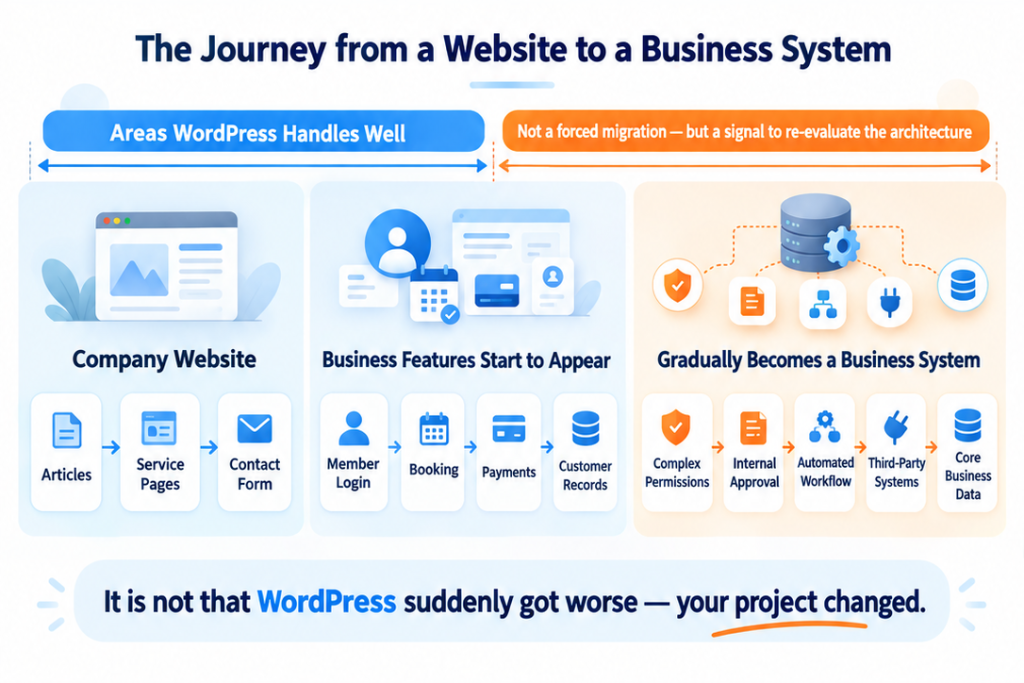
Labels: Mark the left side and the first half of the middle as “Where WordPress excels”. Add a note over the second half: “You don’t have to migrate, but you should reassess the architecture.”
Key image text: WordPress didn’t suddenly get worse. Your project changed.
The real turning point usually isn’t traffic or headcount. It’s when the business logic starts getting complicated. Many projects begin as an ordinary website, then add customer logins, then bookings, payments, a staff portal, customer statuses, approval workflows, automated emails, role-based permissions and data exchange with other platforms.
Looked at individually, WordPress can seemingly handle every one of these. The trouble is that a few years later, the system may have become “WordPress + a dozen plugins + several in-house plugins + piles of custom fields + an external automation platform + legacy code nobody dares touch”. The question is no longer “can WordPress do this?”, because the answer is probably still yes. It’s “if we keep building it this way, will it still be maintainable?”
For example, imagine a rule like this:
A customer belongs to a certain type and has completed three steps, but one status hasn’t been approved yet. If the staff member responsible for that customer is in a different department, an extra review is triggered and two other roles are notified.
That’s no longer typical “website content management”. It’s turning into real business software. Use this table as a quick self-check:
| Signal | More like a content website | More like a business system |
|---|---|---|
| How requirements are described | “What should this page show?” | “Who can do what, under which conditions?” |
| User roles | Editors, administrators | Multiple departments, roles and permission levels |
| Data | Posts, pages, media | Customer statuses, orders, approval records |
| Automation | Form notifications | Multi-step workflows, cross-system triggers |
| Integrations | A few third-party tools | Two-way sync with several core systems |
If more and more of your answers fall in the right-hand column, it’s usually time to reassess your architecture.
A Custom System Isn’t “More Advanced”. It Buys You Freedom
The biggest benefit of a custom system isn’t that it looks more “professional”. It’s that you can design the software around your own business. Take recruitment: if the process is just posting jobs, receiving résumés and contacting candidates, an existing platform is probably more than enough.
But suppose the company’s core process looks like this: candidates are automatically categorised when they enter the system, a recruitment consultant reviews them manually, and they’re re-ranked against each client’s own scoring criteria; some roles need special approval, then a report is generated for the client to confirm before the candidate moves to the next stage. Now the software has become part of the business process itself. If the business keeps changing its own workflow to fit a plugin’s design, the relationship between tool and business has been flipped.
A custom system lets the business decide how data is structured, how permissions are divided, how workflows run, which steps are automated and how it will connect to other platforms in future. But that freedom isn’t free:
| Comparison | WordPress | Custom system |
|---|---|---|
| Time to launch | Fast, core features ready to go | Slower, designed from scratch |
| Upfront cost | Lower | Higher |
| Workflow flexibility | Limited by plugins and architecture | Designed entirely around the business |
| Login, permissions, logging, backups and other infrastructure | Mostly built in | Must be built and maintained yourself |
| Long-term maintenance | Plugin updates and compatibility management | You own the code, testing, releases and monitoring |
A custom system doesn’t remove every constraint. It trades higher development and maintenance costs for more business freedom. If your business doesn’t need that freedom, you don’t need to spend that money.
WordPress and a Custom System Can Work Side by Side
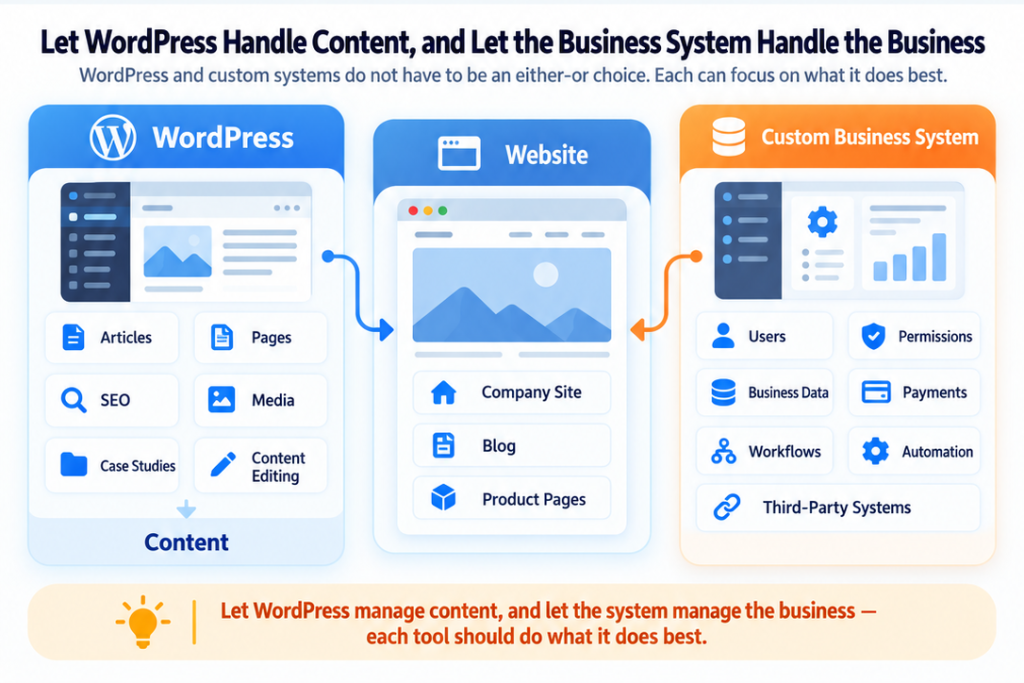
Real-world architecture doesn’t have to be either/or. Many projects work best when different problems are handed to different tools:
| WordPress handles | Custom system handles |
|---|---|
| Business pages | User accounts |
| Blog | Permissions |
| SEO content | Business data |
| Images and media | Workflows |
| Content editing | Automation |
| Marketing pages | Third-party integrations |
Your marketing team can keep publishing in the WordPress admin they already know, while complex customer management, permissions, orders or internal processes run in a separate business system, with the two connected through APIs. This approach is often called Headless WordPress: WordPress acts mainly as the content management back end rather than carrying every responsibility in the system.
Snowsy’s own website follows a similar approach. WordPress handles the content management it’s good at, while the front end and other software features are designed independently based on what’s actually needed. There’s also a very practical benefit: adding a business system doesn’t mean tearing down years of blog posts, SEO pages and content admin. Software architecture doesn’t have to be finished in one go, and splitting things out gradually is often the lower-risk path.
What If You Already Have an Older WordPress Project?
There’s one scenario that often gets overlooked in the “WordPress vs custom” debate: the business already has a WordPress site that’s been running for years. It may contain more than off-the-shelf plugins. Perhaps a previous developer built an in-house plugin to connect to an old system, then left; the plugin hasn’t been updated in years, but the business still relies on it every day.
In this situation, businesses often hear: “It’s too old and we don’t know it, so let’s rebuild it.” Sometimes rebuilding genuinely is the right call, but it shouldn’t be the default answer. Snowsy can take over legacy WordPress projects like these, including unmaintained in-house plugins, custom themes, integrations and other legacy code. The first step usually isn’t an immediate rewrite. It’s understanding what you have:
| Question to assess | Why it matters |
|---|---|
| What is this code actually responsible for? | Avoids removing critical features still in use |
| Which parts of the business still depend on it? | Defines the impact of any change |
| Which plugins or external systems does it connect to? | Surfaces hidden dependencies |
| Are there version, security or compatibility risks? | Sets the priority for fixes |
| Which parts are worth keeping? | Protects your existing investment |
| Which parts should be replaced over time? | Shapes a staged improvement roadmap |
In the past, taking over a completely unfamiliar codebase meant a high upfront cost just to understand it. Today, AI tools can help engineers read unfamiliar code faster, trace call relationships, understand the structure of old plugins and analyse differences between historical versions.
⚠️ That doesn’t mean “we have AI, so we know every technology”. AI still misunderstands things, and it can’t replace an engineer’s judgement about whether an upgrade will break real business operations. What it has changed is this: a software team no longer needs to recommend a rebuild just because a project isn’t in its most familiar tech stack.
At Snowsy, we focus on the software engineering problem itself rather than insisting a client’s project use a particular language or framework. Our main projects may use Java, React or other technologies, but if a client brings us WordPress, PHP or another common system, we’ll understand the current state first and then decide on the right approach. Sometimes the answer is ongoing maintenance, sometimes an upgrade and clean-up, sometimes rewriting a small plugin nobody maintains, and sometimes keeping WordPress while gradually moving increasingly complex business features out of it.
The Real Question Isn’t WordPress vs Custom. It’s What Your Business Needs
If your project is mainly about “how do I present and manage content?”, WordPress is very likely still an excellent choice. If it’s increasingly about “how should different users work, how does data flow and how are business rules enforced?”, it’s time to evaluate a custom system. And if you need both, there’s no reason to force everything onto one technology just so the architecture looks “consistent”.
We’ve seen two opposite kinds of waste. One is a business that only needed an ordinary website but spent a large budget building its own content management system. The other is a project that grew into a core business platform long ago, yet keeps adding plugins and patches because nobody dares touch the existing system.
Both situations share the same problem: technology starts driving the business, instead of the business driving the technology.
When Snowsy assesses projects like these, we don’t default to recommending a full rebuild. If your existing WordPress site can keep running, keep it running. If a legacy plugin is worth fixing, fix it. If some business functions should be split out, split them out gradually. A complete rebuild is only worth serious consideration when the current architecture is clearly holding the business back.
Not Sure What’s Next for Your WordPress Project?
If your WordPress site has been running for years, or there’s an in-house plugin nobody dares touch, the next step isn’t necessarily starting over. Often the most valuable first step is simply this: work out what you have, what still matters, where the risks are, and which problem your next dollar of budget should solve.
👉 [Contact Snowsy to book a project assessment]