

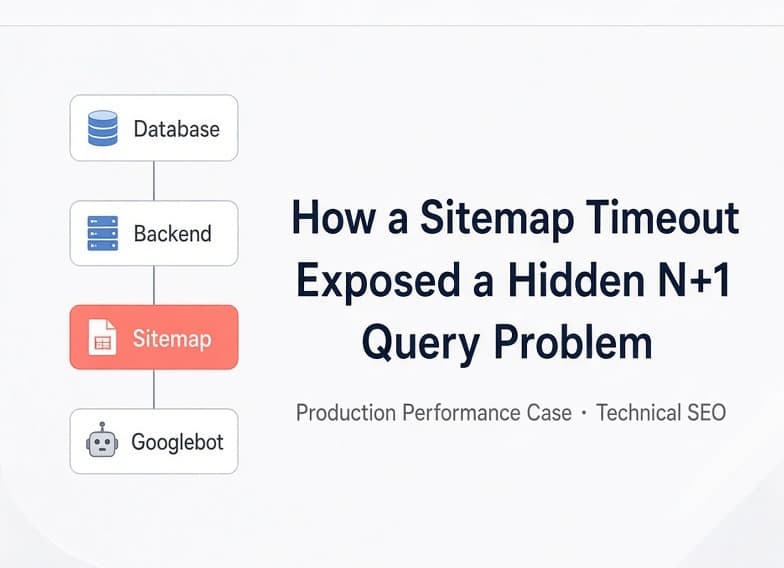
A SEO system that had been running stably for months saw a clear drop in Google Search Console impressions after a content expansion. The root cause was not the SEO content itself, but the way the database was accessed in the Sitemap generation chain.
Many production performance issues do not surface on day one. They often sit dormant in the code until data volume crosses a critical threshold and suddenly the system “breaks.” This case is a classic example. The client’s self-built SEO content system had operated smoothly for months. Front-end pages loaded normally and the back-end remained usable. Only after a batch of new SEO content was imported did Search Console impressions begin to decline noticeably. On the surface it looked like a typical SEO problem. The real issue, however, was buried in the technical pipeline.
Project Background: Search Console Anomalies After Data Growth
The client operated a custom SEO content system designed to manage and generate a large volume of search-engine landing pages. The system had already been running for several months. Existing content showed no obvious faults, and both front-end access and back-end operations remained normal.
Recently the client began bulk-importing a new batch of SEO content. Shortly after the import finished, Search Impressions in Google Search Console dropped noticeably. At first glance it is easy to classify this as a common SEO issue: algorithm updates, new content not indexed in time, page-quality problems, keyword performance fluctuations, or reduced Google crawl frequency.
This time, however, the real problem was not the content itself. While examining the site’s technical SEO infrastructure, we discovered a more immediate anomaly: sitemap.xml had started timing out.
Why a Sitemap Timeout Deserves Priority Attention
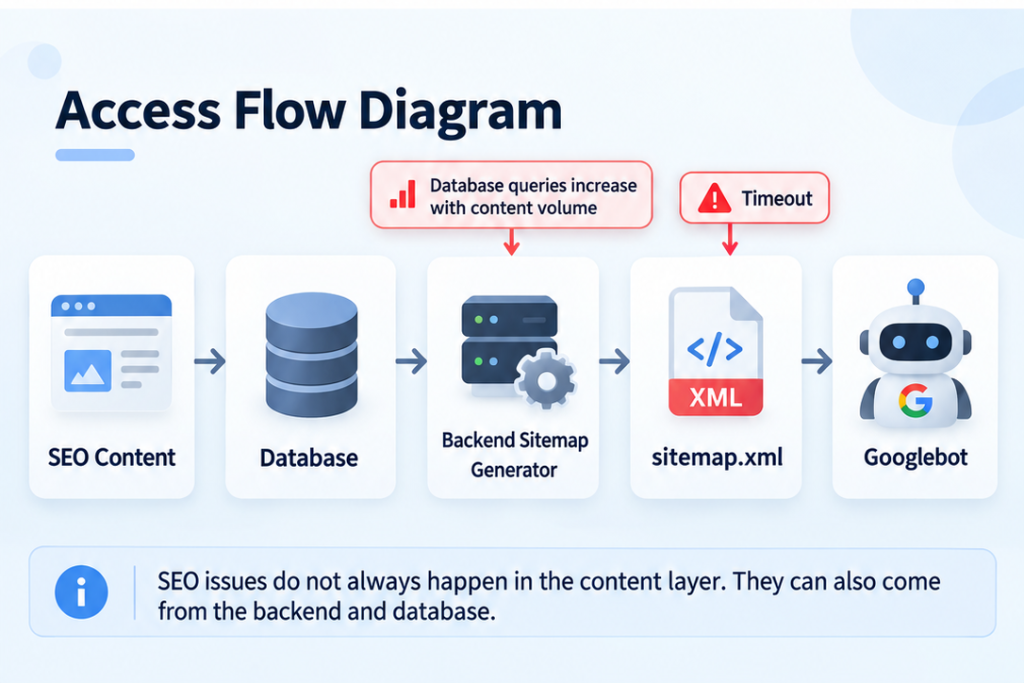
A Sitemap can be understood as the “page inventory” a website provides to search engines. For sites with large numbers of dynamic pages, the Sitemap is rarely maintained by hand. Instead, a back-end process reads page information from the database and dynamically generates the XML file.
The overall chain looks roughly like this: Database → Back-end reads SEO pages → Generates Sitemap → Googlebot accesses it → Search engines discover and re-crawl pages.
Ordinary users almost never open sitemap.xml on purpose. This creates a practical reality: the homepage can load fine while the technical entry point that Googlebot relies on is broken. If the Sitemap times out for extended periods, the efficiency with which search engines discover new pages and revisit existing ones can be affected.
It should be noted that a Sitemap timeout alone does not prove that the entire drop in Search Impressions was caused by this issue. Google Search performance is also influenced by content quality, index status, ranking changes, search demand, and crawl strategy. In this case, however, the Sitemap had a clear technical failure, so it had to be investigated first.
Root-Cause Identification: The N+1 Hidden Behind the Sitemap
Once the Sitemap timeout was confirmed, we did not simply increase the timeout value. A timeout is usually a symptom. The real question was: why did a Sitemap that previously generated without issue now take so long?
Further inspection of the back-end code revealed a classic problem: N+1 Database Queries.
Suppose the Sitemap needs to generate 1,000 pages. A reasonable approach is to retrieve the required data in one or a few batch queries. With an N+1 pattern the logic becomes: first query once to obtain the 1,000 pages, then query the database again while processing the first page, again for the second page, and so on up to the 1,000th page. The result is 1 initial query + 1,000 additional queries = 1,001 queries.
As data volume grows, the problem amplifies rapidly.
| Number of Pages | Approximate Query Count |
|---|---|
| 20 | 21 |
| 100 | 101 |
| 1,000 | 1,001 |
| 5,000 | 5,001 |
These figures simply illustrate the growth pattern of N+1. In a real project, if each SEO page also needs to load categories, metadata, language versions or other related data, the query count can be even higher.
Why the Problem Only Appeared After Months of Operation
The most valuable aspect of this case is not the N+1 itself, but the fact that the problem almost certainly existed from day one. When the system first went live, the data volume was still small enough that the inefficiency stayed hidden.
With only 20 records, the system performed roughly 21 queries. Even with a suboptimal implementation the server could finish quickly. Users noticed nothing and the issue was unlikely to appear in a development environment.
As data continued to grow—tens, hundreds, thousands, then several thousand—query volume and processing time increased in lockstep. Eventually the system crossed a performance threshold. What once took 300 ms became 1 second, then 3 seconds, and finally exceeded the maximum wait time set by the application server, reverse proxy or other components.
From the outside it looks like “why did this feature suddenly break?” From an engineering perspective, the moment a failure appears is not the same as the moment the problem was introduced. The defect may have been present all along; recent data growth simply exposed it.
A system can run normally for months and still contain problems. Some issues are simply waiting for data volume to grow large enough.
How We Optimised: Fix the Root Cause First, Then Reduce Repeated Work
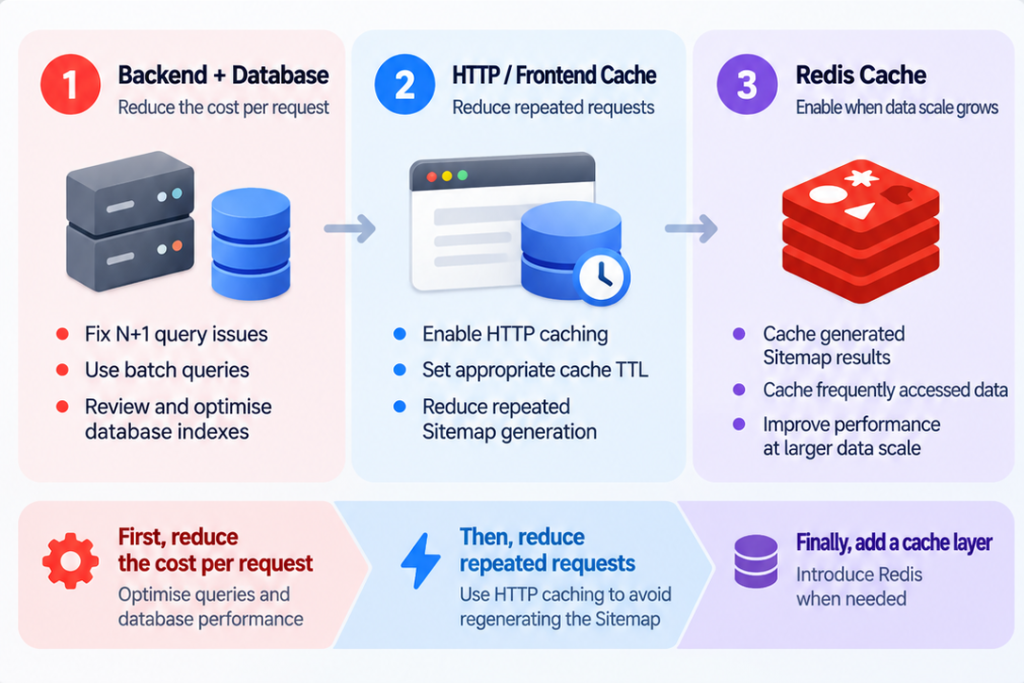
After confirming the issue we did not apply a one-off patch to the Sitemap alone. The optimisation was organised in three layers: back-end and database query improvements, front-end and HTTP cache strategy adjustments, and preparation to leverage the client’s existing Redis infrastructure as a future scaling capability. The goal was not merely “make the Sitemap open today,” but to ensure the data path still has headroom when content continues to grow.
Back-end Optimisation: Locate the Problem Through Code and Database Analysis
The first step was to determine exactly where the problem occurred. We re-examined the back-end data-access logic, including query counts, individual query latency, the presence of looped queries, repeated loading of the same related data, retrieval of unnecessary fields, and whether queries made effective use of indexes.
We also used the database’s own analysis capabilities—ANALYZE, execution plans, index status and actual query behaviour—to identify the true bottlenecks. This step is important because performance problems are not always pure N+1. They can also stem from missing indexes, poorly written JOIN conditions, excessive selected fields, oversized result sets, or query predicates that cannot leverage indexes.
Consequently we did not jump straight to “add caching” or “upgrade the server.” We first answered a more fundamental question: what is the database actually doing? Once the bottlenecks were located, we adjusted the data-access logic—reducing repeated queries inside loops, batch-loading required data, and re-checking query and index design.
Front-end and HTTP Layer: Reduce Unnecessary Repeated Computation
After the back-end query work, we reviewed the front-end and HTTP-layer caching strategy. The Sitemap and certain SEO data do not need to be recomputed on every request. When content updates are relatively infrequent yet every Googlebot request still triggers the full cycle of “read database → assemble data → generate XML → return result,” the system is repeatedly performing the same work.
We therefore adjusted cache settings so that repeated requests for the same resource within a reasonable window could reuse existing results whenever possible.
| Before Optimisation | After Optimisation |
|---|---|
| Every request recomputes | Results reused within a sensible window |
| Repeated traffic always hits the back-end | Some requests served directly from cache |
| Database bears heavy repeated load | Database focuses more on real changes |
| Traffic growth multiplies back-end cost | Cache absorbs part of the repeated load |
Of course, longer cache is not always better. If Sitemap cache lifetime is too long, newly added pages may not appear promptly. If there is no cache at all, large amounts of redundant work are generated. The right balance must be struck between data freshness and system performance.
Redis: Not Forced Today, but Reserved for Larger Scale
The client’s existing system already included Redis caching infrastructure. After the back-end and HTTP-cache improvements, the current data volume did not yet require Redis in order to function correctly. We therefore did not force every piece of data into Redis simply to make the architecture look more sophisticated; doing so would have introduced new complexity around cache invalidation, data consistency, cache misses, update synchronisation and key design.
Because Redis was already available, we incorporated it into the future scaling plan. If SEO data volume continues to grow, candidates for caching include Sitemap generation results, SEO page lists, page metadata, high-read/low-write data, and certain aggregation results.
Why We Did Not Simply Upgrade the Server
When faced with a Sitemap timeout, the simplest responses are often: add more CPU, add more RAM, upgrade the database tier, raise the timeout from 10 seconds to 30 seconds, or increase the reverse-proxy wait time. These measures can sometimes provide temporary relief, but they do not change the underlying growth relationship of the system.
If the original logic was 1,000 pages → 1,001 queries, a larger server may make those 1,000 queries run faster. When the volume later becomes 10,000 pages → 10,001 queries, the problem returns.
What we care about more is whether system cost grows unreasonably in step with data volume. That is why code-level optimisation and cache design matter more than simply throwing hardware at the problem. Server upgrades raise the ceiling; query optimisation changes the growth curve.
Lessons for Rapid Development and Vibe Coding
This project is not intended to prove that rapid development is unreliable. On the contrary, quickly building demos, MVPs, CMSs, admin panels, landing pages, SEO pages or payment flows has genuine value—it turns an idea into a real product faster.
After code is generated quickly, however, a common misconception arises: “it runs” is treated as equivalent to “the system is finished.”
| What a Demo Can Verify | What a Demo Usually Cannot Verify |
|---|---|
| The page opens | Whether it still opens with 10,000 records |
| The Sitemap can be generated | Whether it still generates after thousands of pages |
| Data can be saved | Whether queries remain reasonable as data grows |
| An API can return a response | How the system behaves when a third party slows down |
| The back-end is usable | Whether performance remains acceptable as the business scales |
This is why many systems do not fail in the first week after launch. They may run for months until data grows rapidly for the first time, user numbers increase, SEO pages expand significantly, search engines begin crawling more frequently, or background jobs process ever-larger datasets—only then do the latent problems become visible.
Engineering Conclusions and Next Steps
This case ultimately illustrates a very typical production-environment truth: “it works now” does not equal “it will keep working later.”
From the client’s perspective the system had been stable for months. From a code perspective the performance issue may have existed from day one. From a business perspective a normal increase in data volume finally triggered a hidden system bottleneck.
Therefore, once a product has entered real operation, technical checks should not stop at “are there any bugs right now?” They should continue to ask: what happens if data keeps growing? What happens if user numbers increase? What happens if search-engine crawl frequency rises? Which problems have simply not yet reached their triggering conditions?
A demo proves that a feature can be implemented. Production engineering must prove that the system can continue to operate as the business grows.
Project Information
| Dimension | Details |
|---|---|
| Project Type | SEO Platform / Web Application |
| Problem Type | Performance / Technical SEO / Database |
| Primary Symptom | Sitemap Timeout |
| Root Cause | N+1 Database Queries |
| Trigger Condition | Noticeable growth in SEO data volume |
| Impact Scope | Sitemap availability, search-engine crawl path |
| Optimisation Approach | Back-end query optimisation, database analysis, HTTP cache, Redis scaling preparation |
Has your system also been running for several months? Many production problems do not appear on launch day. They usually wait until data multiplies, users grow, SEO pages expand, or the business truly starts to scale.
If your system is already live but you are unsure whether database queries, caching, SEO infrastructure or back-end performance can support the next stage of growth, Snowsy can help with a Production Health Check. We focus not only on “can it run today,” but on “will it still run when the business continues to grow.”
View Technical Health-Check Services
This case study is based on real project experience at Snowsy. To protect client privacy, client names, business data, system scale and certain technical implementation details have been anonymised or abstracted. The content is intended to illustrate diagnostic and engineering analysis methods and does not claim that a Sitemap failure necessarily causes specific SEO ranking or traffic changes.